 Retypo
Fix a typo in a scanned PDF as if it were a Word file.
Tap the line, retype it, save. The font, size and layout stay as they were, on scans and photographs too. Everything happens on your phone: no account, no uploads, no advertising.

Scanning, signing, filling in forms and organising are free. Retyping, redaction and conversion are Premium, by the year or once, for good.
Most apps paste a white patch over the word. Retypo retypes it.
Text recognition reads the line, the original letters are removed from the page, and your new text is set in a matching face and size. The result is an ordinary PDF that any reader opens as text.
Open any PDF
From Files, Mail, a photograph, or the scanner built into the app. Printed forms and old scans work too.
Tap the line and retype
Font, size, weight and colour are kept. The paragraph reflows around what you changed.
Save and send
A clean file with no watermark. Any of your last five versions can be brought back.
One app for the whole document.
Fill in and sign
Tap a field and type. Your signature is fitted to its box. On a scanned form Retypo finds the blanks itself, and your name and address are filled in for you.
Redact, properly
A redacted PDF has the text taken out of the file, not hidden under a black box. Names and account numbers cannot be recovered afterwards.
PDF to Word, Excel, PowerPoint
An editable .docx with headings, tables and pictures in place; every table as a sheet with numbers as numbers; one slide per page. Scans included, all converted on the device.
Scan and merge
Paper to PDF with automatic edges and cropping, A4 or Letter. Photographs to PDF. Merge files; reorder, rotate and delete pages; print from the app.
Lock and protect
Password-protect a PDF (AES-256) before sharing it and decide whether it may be printed or copied. Lock the app itself with Face ID, Touch ID or a passcode.
Read and organise
EPUB books and PDFs on one shelf, with a paper-like page and trimmed margins. Folders, search and drag-and-drop; two panes side by side on iPad. PDF to EPUB is included.
Four screens, as they are.
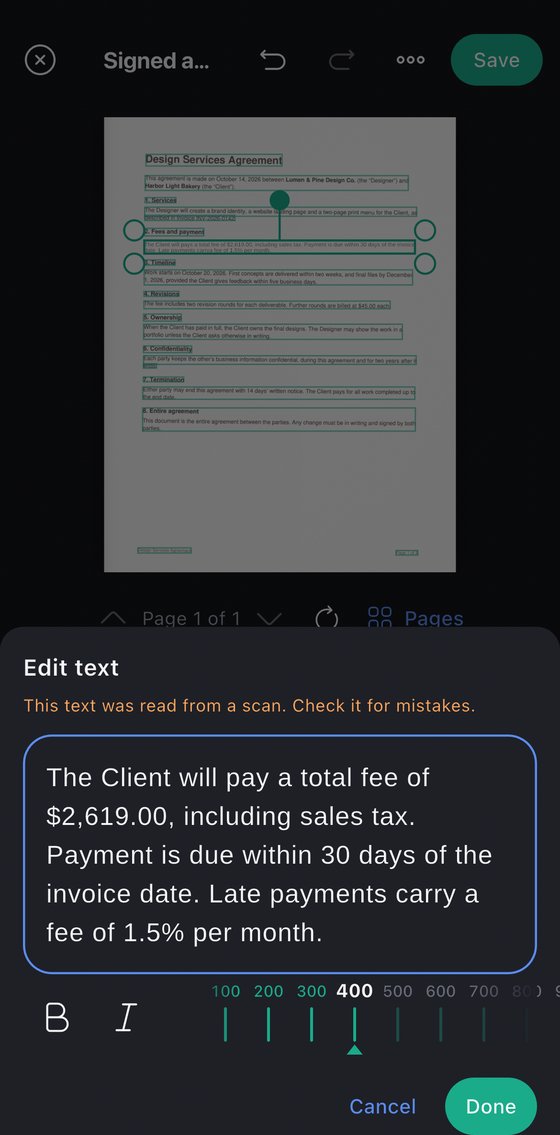
The recognised line, open for editing.
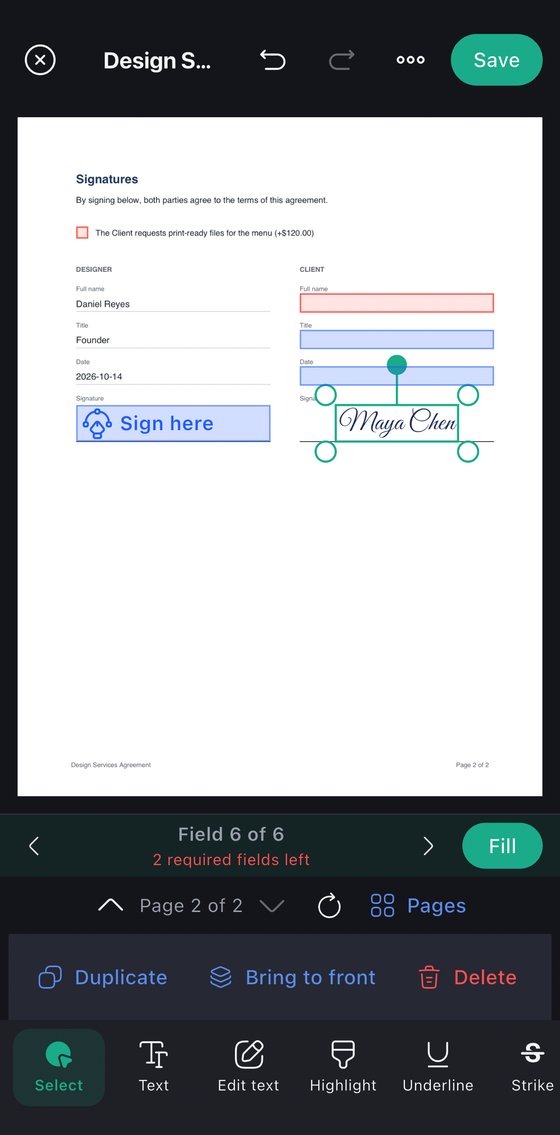
A signature fitted to its field.
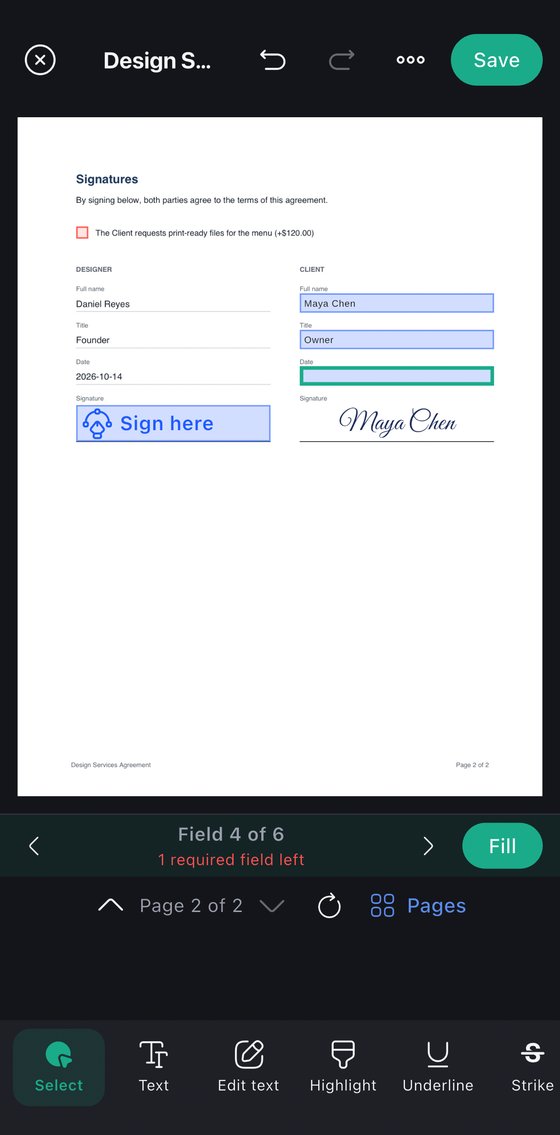
Field by field, required ones counted.
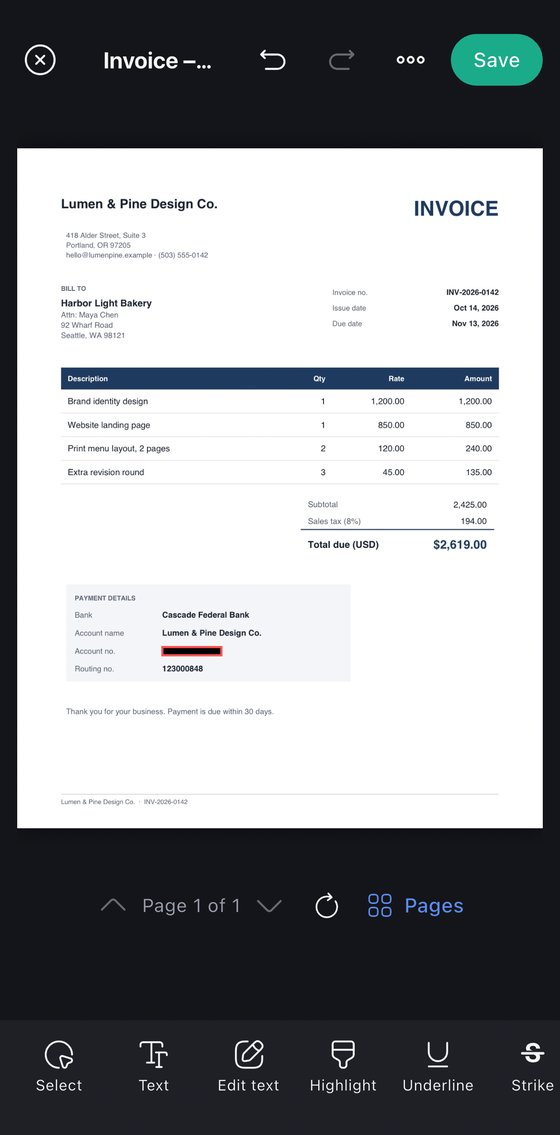
Bank details removed from the file.
Three things we don't do.
We don't upload your documents.
Recognition, editing and conversion run on the device. Turn off Wi-Fi and the app works exactly the same. There is no Retypo server that ever sees a file.
We don't ask who you are.
No account, no email address, no phone number. Your library is encrypted on the phone and backed up only where you put it.
We don't stamp or sell.
No watermark on your files, no advertising around them, no weekly plan designed to be forgotten.
Pay by the year, or once.
Prices in US dollars; your store shows the price for your country. Every Premium tool can be tried a few times before you decide.
No limits on what's included.
- Scan, photo to PDF, text recognition
- Sign and fill in forms
- Notes, highlights, added text
- Merge, arrange, lock, back up
- Read, organise, PDF to EPUB
- Retype existing text
- Redaction
- PDF to Word, Excel, PowerPoint
$9.99 for the first year. Or $3.99 a month.
- Everything in Free
- Retype existing text, scans included
- Redaction that removes the text
- PDF to Word, Excel, PowerPoint
One purchase on your Apple ID or Google account. No subscription.
- Everything in Premium, for good
- Future updates included
What people ask first.
Does it really edit scanned PDFs, or just cover them?
It edits them. On-device text recognition turns the scan into words, the original letters are removed from the page and your new text is drawn in a matching font and size. Open the result in any other app and the line reads as text.
Are my documents uploaded anywhere?
No. Recognition, editing and conversion run on the phone. There is no Retypo account and no server that sees your files. The only network use is the app store for purchases, and anonymous crash and usage statistics.
Which languages does the text recognition read?
English, Vietnamese, Japanese, Korean and Chinese. Retyping works best with printed text; handwriting is read less reliably.
What is free and what is Premium?
Scanning, signing, filling in forms, notes, merging, locking, backup, reading and PDF to EPUB are free without limits. Premium covers the heavy work: retyping existing text, redaction, and PDF to Word, Excel and PowerPoint. Each Premium tool can be tried a few times for free.
Is there a version for Mac, Windows or the web?
Not yet. Retypo is an iPhone, iPad and Android app. If a desktop version would matter to you, write to the address at the foot of this page.
Can I move my library to a new phone?
Yes. Back the whole library up to one file or to iCloud and restore it on the new phone. The backup is an ordinary zip, so the PDFs inside are readable even without the app.
Free to download.
iPhone, iPad and Android.